
Blog
Bitwarden CLI compromise: pin now or pay later
This is the same campaign pattern we saw hit Trivy, axios, LiteLLM, and CheckMarx KICS earlier in Q1 as part of TeamPCP. Different package, same playbook: compromise a dev-adjacent tool, ride mutable references into CI, exfiltrate credentials. Expect more.

Benji Kalman
VP of Engineering, Co-Founder
Published :
Apr 24, 2026


Short version from a responder perspective: for most teams there is nothing left to patch for @bitwarden/cli@2026.4.0. The malicious package was pulled, the distribution window has closed, and this is now primarily an exposure-verification + hardening event.
That does not mean ignore it. It means:
Confirm you were not exposed during the malicious publish window.
Rotate if exposure is possible.
Use this as a forcing function to lock in pinned and monitored CI/CD practices.
This is the same campaign pattern we saw hit Trivy, axios, LiteLLM, and CheckMarx KICS earlier in Q1 as part of TeamPCP. Different package, same playbook: compromise a dev-adjacent tool, ride mutable references into CI, exfiltrate credentials. Expect more.
If you'd rather not wait for the next one to find you, Root continuously patches the open source you're running. Free tier available. One line change in your Dockerfile.
Why patching isn't the move
Defenders often over-rotate into patch theater. The actionable reality here is simpler:
The malicious npm version is no longer the current trusted artifact.
If you did not install or use the compromised package during the affected window, there is typically no active remediation to perform.
The durable risk is your process (mutable dependencies and weak CI controls), not that specific package lingering forever.
Bitwarden's incident note and release stream are the source of truth: https://bitwarden.com/help/releasenotes/#cli.
Quick triage
Check whether any workstation or runner installed
@bitwarden/cli@2026.4.0during the impacted window.If yes, treat it as potential credential exposure: rotate tokens and keys, review CI and workflow activity.
If no, close the incident and move straight to preventative controls.
Socket has campaign context on the CI/CD credential theft pattern: https://socket.dev/blog/bitwarden-cli-compromised.
Pin. Then monitor.
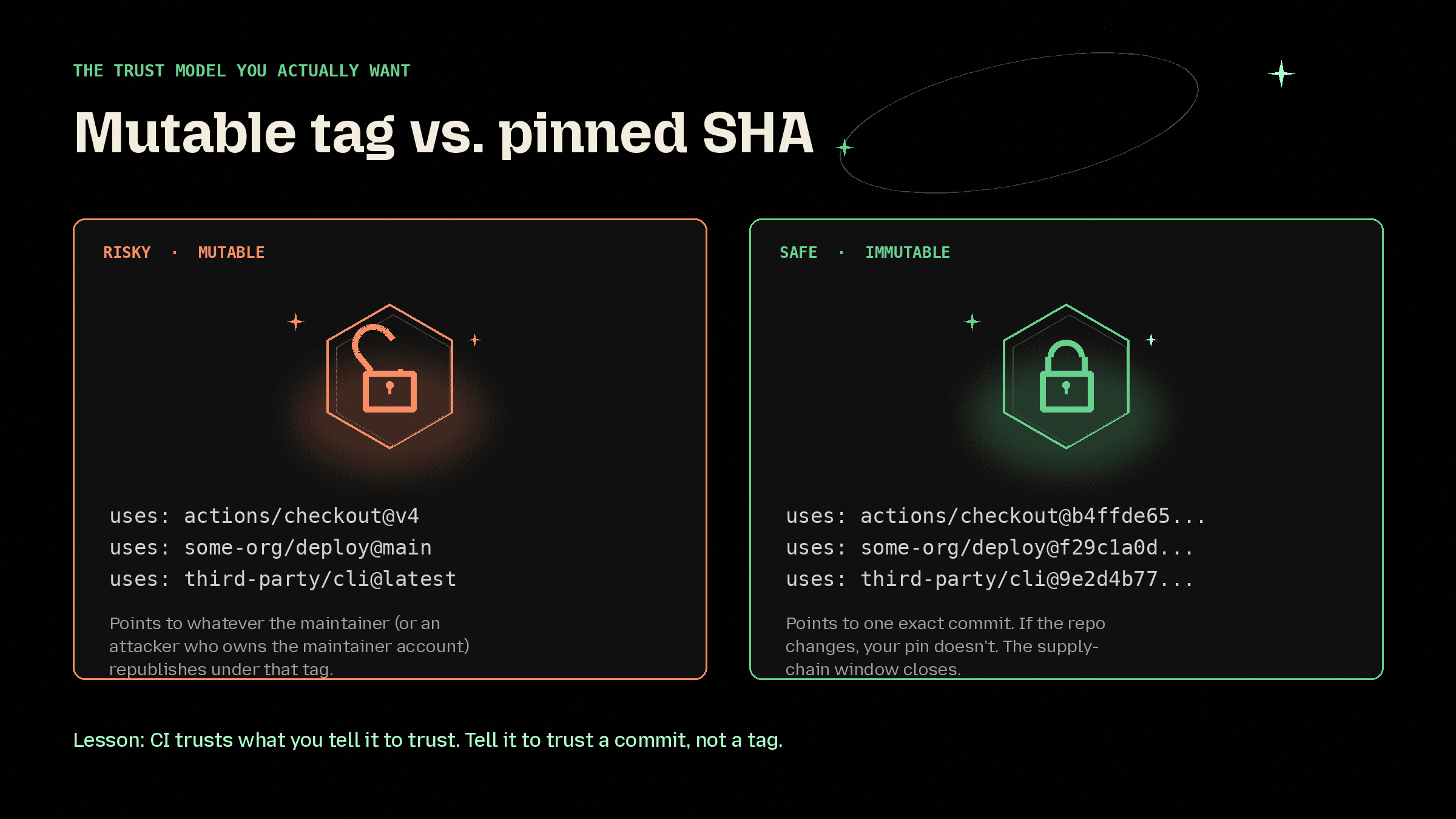
The one control that would have contained this class of attack: pin every third-party GitHub Action to a full commit SHA, not tags like @v1. A SHA points to one exact commit. A tag points to whatever the maintainer (or an attacker who owns the maintainer) republishes.
GitHub's baseline hardening guidance walks through this and the rest of the defaults worth turning on: https://docs.github.com/en/actions/reference/security/secure-use.
Stop being the next case study. Start free with Root.
Pinning closes one door. Root closes the rest.
Root continuously monitors and patches the open source your stack depends on, across containers and libraries, before the next poisoned update lands. Same code, fixed supply chain, no forced upgrades.
Sign up free at images.root.io and pull from 500+ continuously remediated images. One line change in your Dockerfile. That's the whole install.
Want the deeper read first?
Pinned-first strategy: https://www.root.io/blog/defending-software-supply-chain-attacks-with-a-pinned-first-dependency-strategy
How Root works: https://www.root.io/how-it-works
Bottom line
This specific package event is often effectively done by the time you read about it. The win is not emergency patching. The win is turning each incident into a permanent pin. That's the shift: from "what did we install" to "what did we commit to."
Root is how you make that shift across your whole stack. Start free.
Further reading
Bitwarden release notes: https://bitwarden.com/help/releasenotes/#cli
Socket incident write-up: https://socket.dev/blog/bitwarden-cli-compromised
GitHub Actions secure use reference: https://docs.github.com/en/actions/reference/security/secure-use
GitHub on staying ahead of open-source attacks: https://github.blog/security/application-security/how-to-stay-ahead-of-open-source-attacks/
Continue Reading